CAN Bus Connector Guide · CiA 303-1 / CiA 106

RJ45 CAN bus pinout

Many drives, battery systems and CAN interfaces use RJ45 sockets so devices can be daisy-chained with ordinary patch cables. CiA recommends one pinout — but not every vendor follows it, which is the source of many “why won’t my battery talk to my inverter” problems.

  • StandardCiA 303-1 / CiA 106
  • Pins8
  • Bit rateUp to 1 Mbit/s
  • Found onCAN interfaces, drives, battery & inverter systems
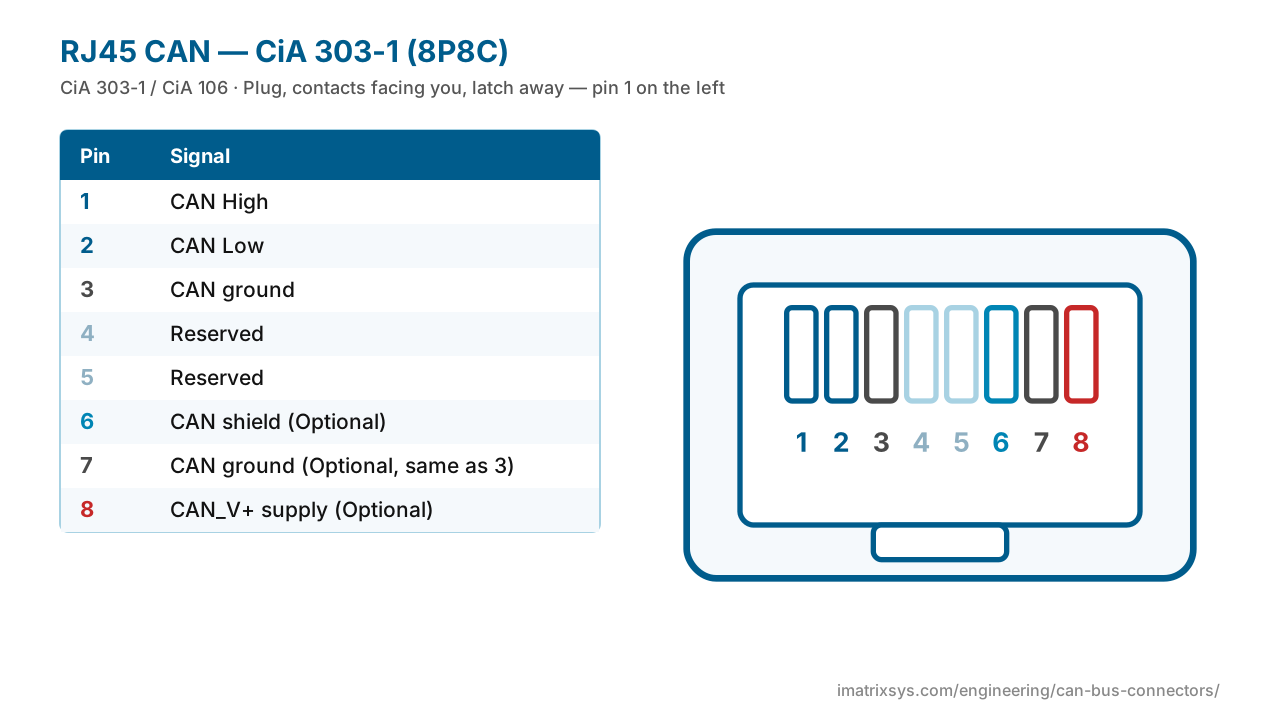
RJ45 CAN — CiA 303-1 (8P8C) face view12345678
Interactive pinout

RJ45 / 8P8C (CiA) pin assignments

In the CiA layout pin 1 is CAN High and pin 2 CAN Low — a twisted pair in standard Cat5e/6 — with ground on 3 and 7, shield on 6 and supply on 8. Switch to the Victron VE.Can variant to see a common alternative.

View
Pin-out
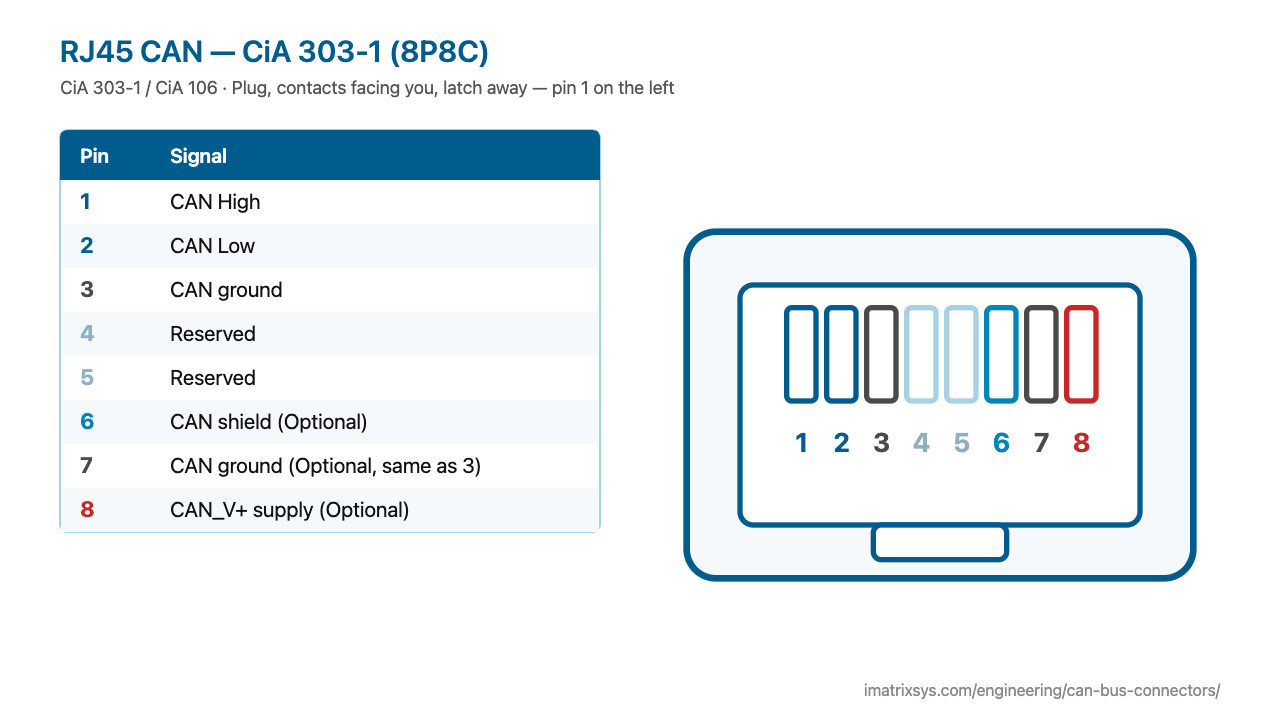
RJ45 CAN — CiA 303-1 (8P8C) face view12345678

Plug, contacts facing you, latch away — pin 1 on the left

RJ45 CAN — CiA 303-1 (8P8C) pin assignments
PinSignal
1CAN High
2CAN Low
3CAN ground
4Reserved
5Reserved
6CAN shield — Optional
7CAN ground — Optional, same as 3
8CAN_V+ supply — Optional
Hover or tap a pin in the drawing or the table to trace it.
CANGroundPowerShieldReserved / unused
RJ45 CAN — CiA 303-1 (8P8C) pinout diagram — CiA 303-1 / CiA 106
RJ45 CAN — CiA 303-1 (8P8C) pinout diagram — free to use with credit to iMatrix Systems. ⬇ SVG ⬇ PNG

At a glance

RecommendationCiA 303-1, now CiA 106
CAN pair1 High, 2 Low (one twisted pair in T568A/B cable)
Other pins3 and 7 ground, 6 shield (optional), 8 supply (optional), 4/5 reserved
CableStraight-through Cat5e/6 works physically
Pin 1Plug with contacts facing you and latch away: pin 1 on the left

OEM variant diagrams

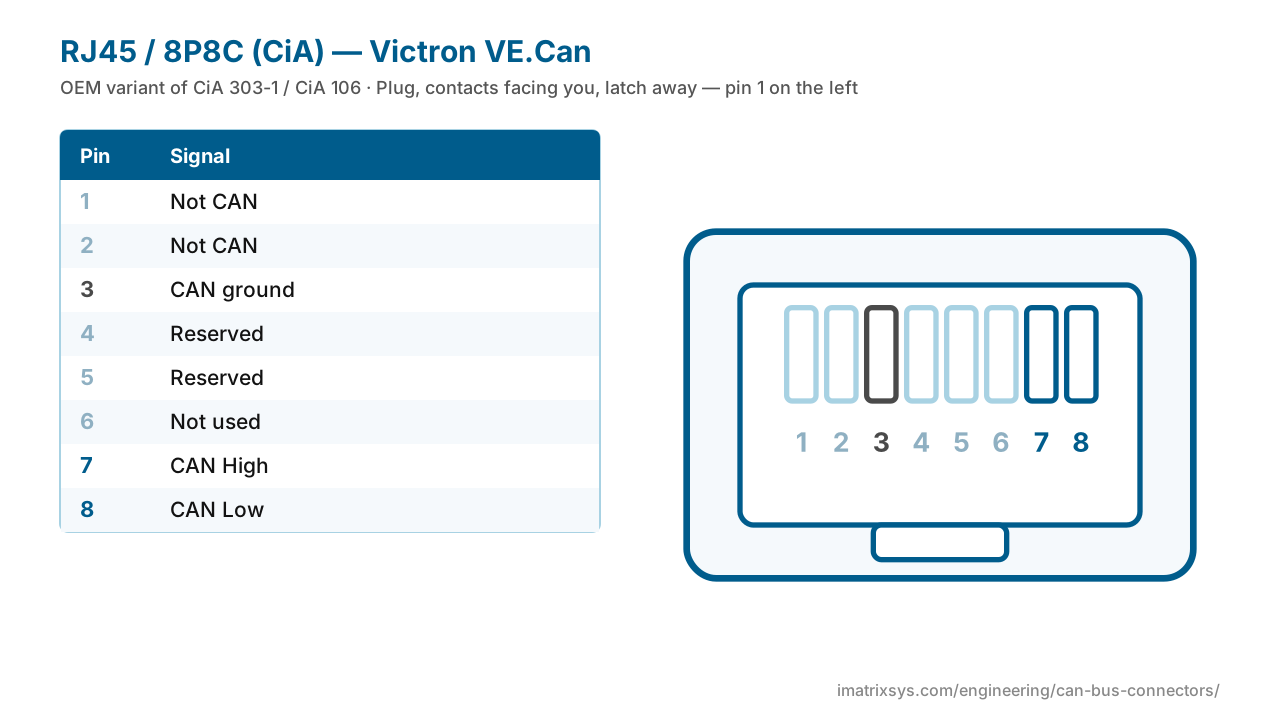
RJ45 CAN — CiA 303-1 (8P8C) — Victron VE.Can variant pinout
RJ45 CAN — CiA 303-1 (8P8C) — Victron VE.Can variant pinout⬇ SVG

History

CiA specified the RJ45 assignment alongside the D-sub and M12 in its CANopen connector recommendation (CiA 303-1), now consolidated in CiA 106. It caught on wherever cheap pre-made patch cables and daisy-chained devices make life easier: building automation, drives, and solar and battery systems.

Where you will find it

  • Battery management systems and inverters
  • Drives and PLC CANopen ports
  • CAN interfaces and gateways
  • Building automation
RJ45 CAN is not universal. Victron VE.Can uses pins 7 and 8 for CAN with ground on 3; other vendors use 4/5. Check both devices before buying or making a cable — and never plug a CAN RJ45 port into Ethernet or PoE equipment.
Wiring diagrams

Convert RJ45 / 8P8C (CiA) to another connector

Choose any two connectors to get a pin-to-pin wiring diagram, with wire colours, which pins to leave unconnected, and the power and termination warnings that matter. Hover a wire to trace it.

Pick two connectors to draw the wiring. (Needs JavaScript.)

    FAQ

    RJ45 / 8P8C (CiA) questions

    What is the RJ45 CAN pinout?

    Following CiA: pin 1 CAN High, 2 CAN Low, 3 ground, 7 ground, 6 shield (optional), 8 supply (optional), 4 and 5 reserved.

    Can I use a normal Ethernet cable for CAN?

    Yes — a straight-through Cat5e or Cat6 patch cable works, and pins 1 and 2 form a twisted pair. Never connect a CAN port to Ethernet or PoE equipment.

    Why won't my battery talk to my inverter over RJ45?

    Vendors use different RJ45 CAN pinouts — Victron puts CAN on pins 7 and 8, CiA on 1 and 2. Check both sides and use a matching or custom cable.

    Which way is pin 1 on an RJ45 plug?

    Hold the plug with the contacts facing you and the latch away from you: pin 1 is on the left.

    Sources: HMS / Ixxat CAN connector pin reference; CiA 106 connector pin assignment; ICC: locating position 1 on RJ45; Victron: VE.Can RJ45 BMS cable.

    Last reviewed 2026-10-27. Pin assignments follow CiA 303-1 / CiA 106; OEM variants are noted where we could verify them. Spotted an error? Tell us.

    More connectors

    Other CAN bus connector pinouts

    Need a RJ45 / 8P8C (CiA) adapter or harness?

    iMatrix designs and builds CAN, J1939 and OBD-II harnesses for OEMs and fleets, and our FleetConnect telematics devices plug straight into the 9-pin and OBD-II ports. Tell us the two ends and the quantity.