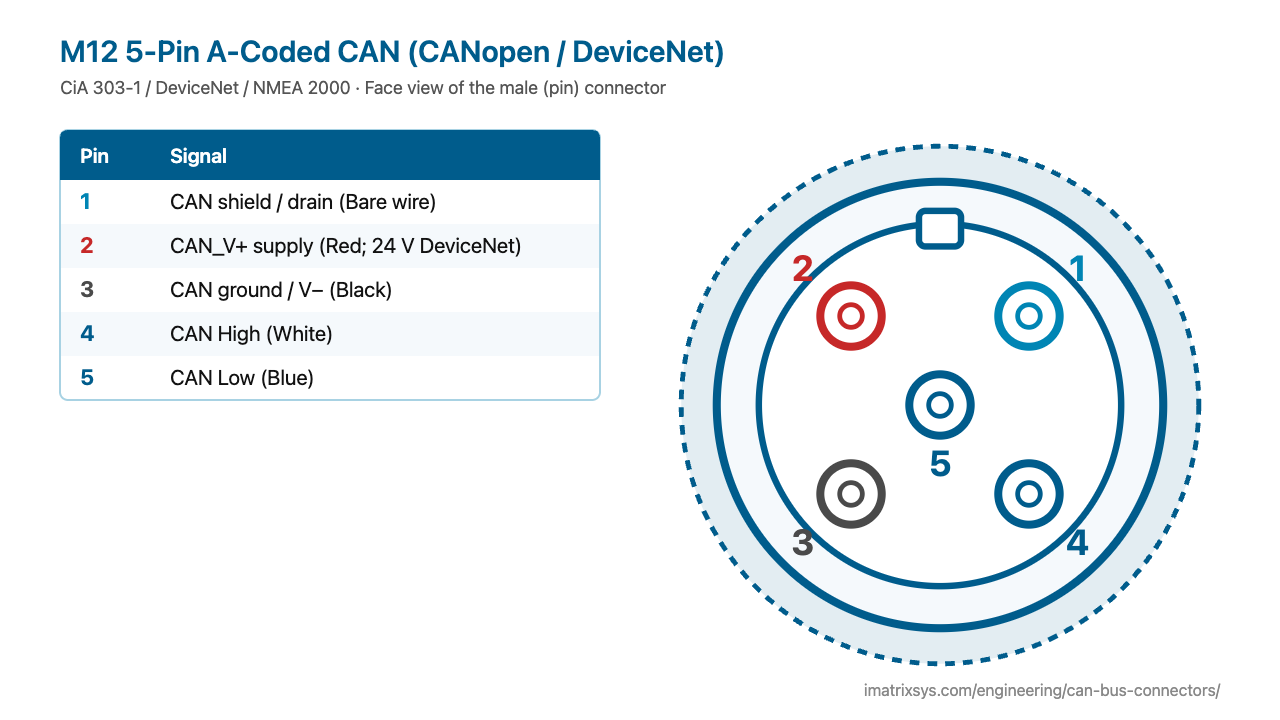
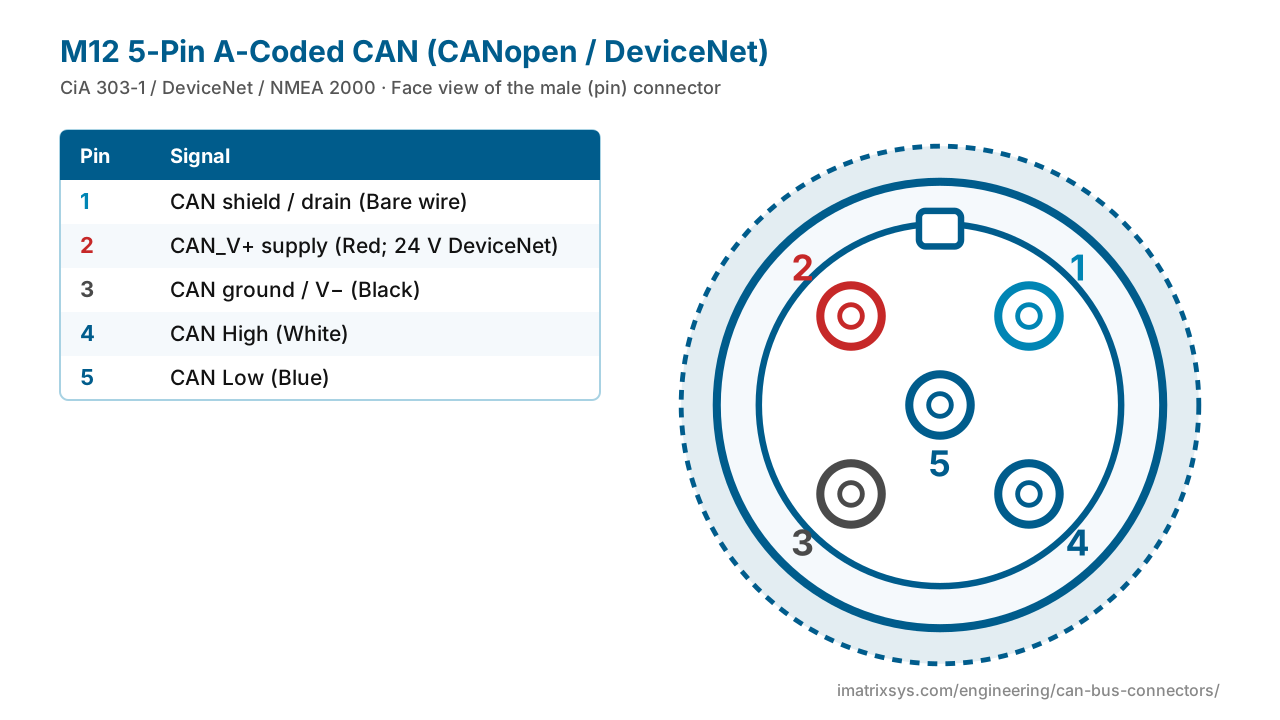
The threaded M12 5-pin A-coded connector is the sealed, IP67 way to wire CANopen and DeviceNet in factories and on mobile machines, and the same layout carries NMEA 2000 on boats.
Pin 5 sits in the centre and carries CAN Low; 4 is CAN High, 3 ground (V−), 2 supply (V+) and 1 the shield. Switch to the female face — it is the mirror image.
Face view of the male (pin) connector
| Pin | Signal |
|---|---|
| 1 | CAN shield / drain — Bare wire |
| 2 | CAN_V+ supply — Red; 24 V DeviceNet |
| 3 | CAN ground / V− — Black |
| 4 | CAN High — White |
| 5 | CAN Low — Blue |
| Coding | A-coded, 5 positions, M12×1 thread (IEC 61076-2-101) |
|---|---|
| Pins | 1 shield, 2 V+, 3 V− / ground, 4 CAN High, 5 CAN Low |
| DeviceNet colours | Bare drain, red V+, black V−, white CAN High, blue CAN Low |
| Supply | 24 V on DeviceNet; NMEA 2000 runs a 12 V network |
| Termination | 120 Ω across 4–5 in a terminator plug at each trunk end |
M12 circular connectors grew out of factory sensor and actuator wiring and are standardised in IEC 61076-2-101. The fieldbuses built on CAN — CiA’s CANopen and ODVA’s DeviceNet — adopted the 5-pin A-coded version for sealed field wiring, with power and the CAN pair in one connector. The marine NMEA 2000 network later reused the same layout.
Choose any two connectors to get a pin-to-pin wiring diagram, with wire colours, which pins to leave unconnected, and the power and termination warnings that matter. Hover a wire to trace it.
Pick two connectors to draw the wiring. (Needs JavaScript.)
Pin 1 shield, 2 V+ supply, 3 ground (V−), 4 CAN High, 5 CAN Low — pin 5 is the centre pin.
A-coding is the single-key layout used for sensors, power and fieldbuses such as CANopen and DeviceNet. Other codings (B for PROFIBUS, for example) are keyed differently so they cannot be mis-mated.
The connector and pin functions match (V+ on 2, ground on 3, CAN on 4 and 5), but the network voltage and the protocol differ.
In DeviceNet/CAN cable, CAN High is white and CAN Low blue, with red V+, black V− and a bare drain. Generic sensor cables use brown, white, blue, black and grey instead, so check the datasheet.
Pin 5, which carries CAN Low.
Sources: CSS Electronics: M12 to DB9 cable; Phoenix Contact 1507573 (M12 CAN); L-com: M12 connector coding; CiA 106 connector pin assignment; HMS / Ixxat CAN connector pin reference.
Last reviewed 2026-10-27. Pin assignments follow CiA 303-1 / DeviceNet / NMEA 2000; OEM variants are noted where we could verify them. Spotted an error? Tell us.
iMatrix designs and builds CAN, J1939 and OBD-II harnesses for OEMs and fleets, and our FleetConnect telematics devices plug straight into the 9-pin and OBD-II ports. Tell us the two ends and the quantity.