Engineering · DBC Tools

Decode any CAN bus.

Open your DBC files and CAN traces right here in the browser. Messages, signals, bit layout, editing, trace decoding and version compare — and your files never leave your machine.

Open DBC Tools ↓
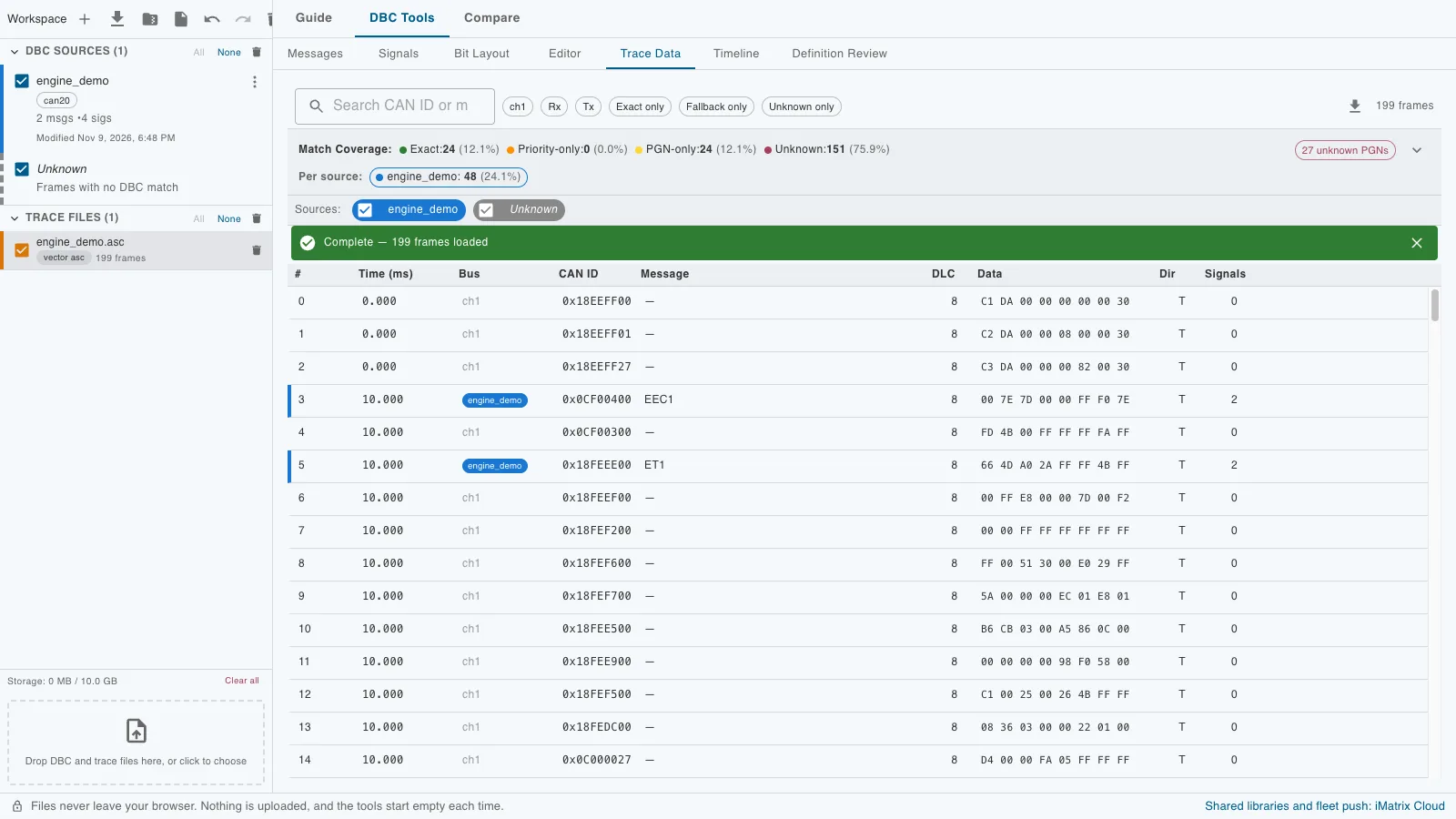
iMatrix DBC Tools showing a DBC's messages, a signal's bit layout and a decoded trace

iMatrix DBC Tools

Load one or more DBC files, browse their messages and signals, see how every signal packs into the payload, edit and export a .dbc, and decode candump, PCAN, Vector or iMatrix trace files against everything you’ve loaded.

Files never leave your browser. Nothing is uploaded, and the tools start empty each time you open them.

Built for a laptop or desktop screen. On a phone the tools open full screen.

Request a complimentary month of Telematics Engineering

Includes Forge, shared DBC libraries and fleet tools. iMatrix sales reviews each request and will email you.

What would you convert? (optional)
Protocol
Document
Size

Please don’t attach documents here.

Protected by reCAPTCHA — Privacy & Terms.

Everything you need to read a DBC.

Several DBCs side by side

Load OEM, supplier and tier-1 DBC files together, each with its own colour and bus name, and browse every message and signal across all of them in one view.

Bit-level signal packing diagrams

Visual byte-and-bit layout for every message. See exactly where each signal sits in the 64-bit payload, big-endian or little-endian, signed or unsigned — no more guessing.

Decode trace files you open

Open a candump, PCAN .trc, Vector .asc or iMatrix trace. Every frame is decoded against the DBCs you’ve loaded into named signals, units and engineering values, and the timeline plots signals over time.

Compare across versions

Diff two versions of a DBC and catch the silent revisions when a supplier updates a file: added, removed and changed messages and signals.

Edit and export

Change messages, signals, scaling and units in the DBC editor, then export a clean .dbc file.

Definition review

A review report on any DBC: overlapping signals, layout problems and definitions worth a second look before they reach a fleet.

PGN 65262 · Engine Temperature 1

7
6
5
4
3
2
1
0
7
6
5
4
3
2
1
0
7
6
5
4
3
2
1
0
·
·
·
·
·
·
·
·
SPN 110 · Coolant Temp SPN 174 · Fuel Temp SPN 175 · Oil Temp

Working across a whole fleet?

In iMatrix Cloud the same tools work with your team’s shared DBC library and large trace sessions, and send the decode configuration to your devices. For traces you want analysed for you, see Trace Analysis.

← Back to Engineering Suite Talk to us about iMatrix Cloud →

From the spec to the fleet

Related products

Putting this on real vehicles?

Tell us what you run and a telematics engineer will walk you through the right hardware, plan and data for your fleet.

Also see: J1939 Gateway · Fleet Solutions · CAN Bus Data · NavPro · EdgeUplink eSIM