CAN Bus Connector Guide · CiA 303-1 / CiA 106

DB9 (D-sub 9) CAN bus pinout

Almost every PC CAN interface, logger and gateway uses a 9-pin D-sub with the pin assignment recommended by CAN in Automation (CiA). Here is the layout, which side is male, and how to wire it to vehicle connectors.

  • StandardCiA 303-1 / CiA 106
  • Pins9
  • Bit rateAny (classic CAN & CAN FD)
  • Found onPC CAN interfaces, loggers, gateways, test benches
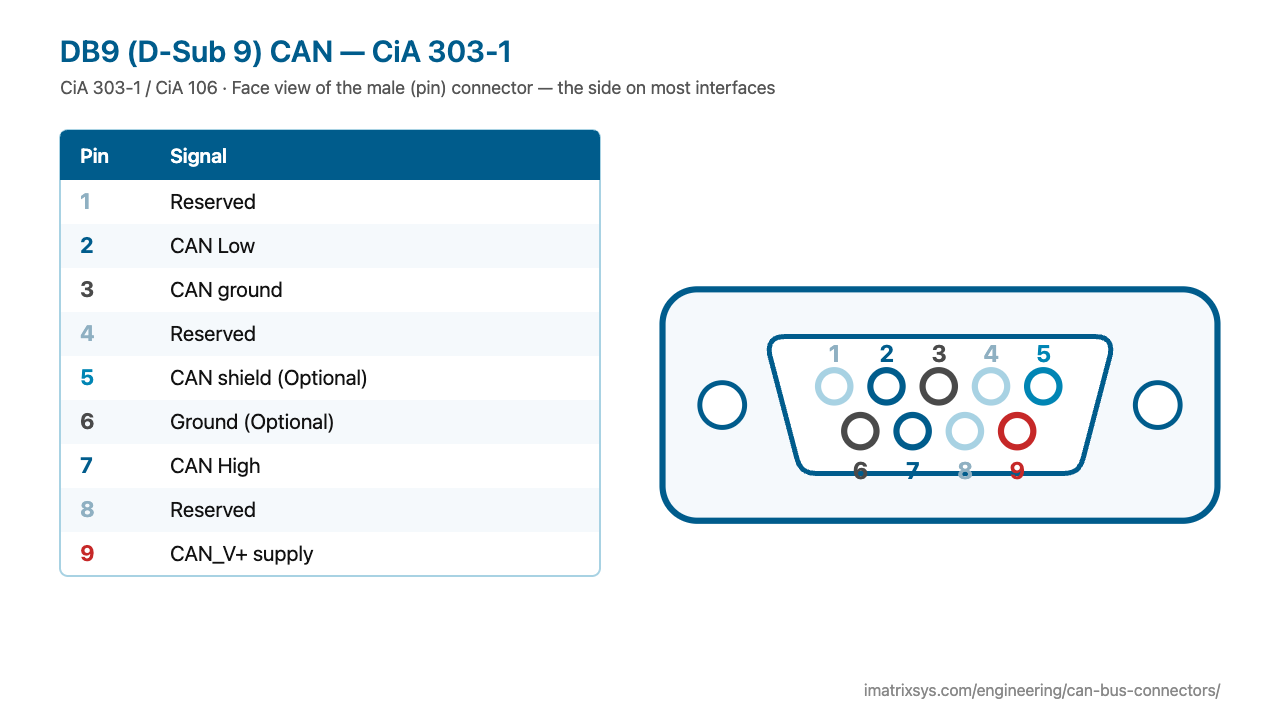
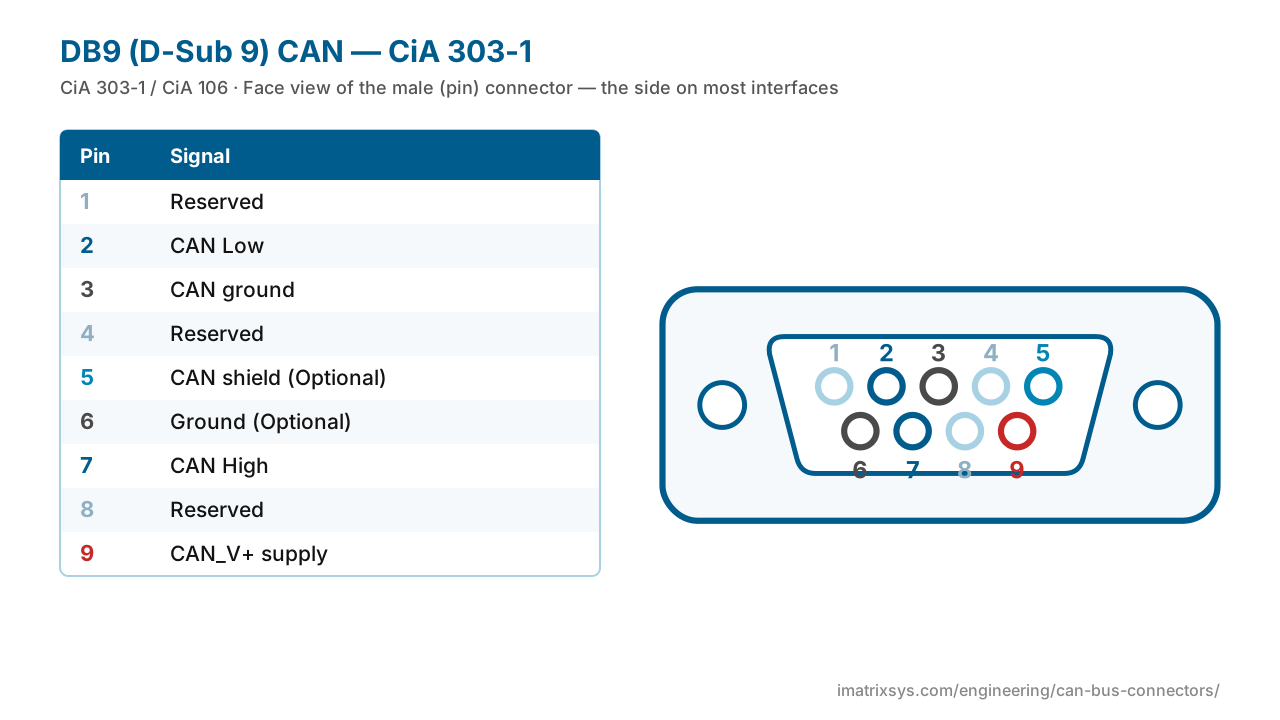
DB9 (D-Sub 9) CAN — CiA 303-1 face view123456789
Interactive pinout

DB9 / D-Sub 9 (CiA) pin assignments

Pin 7 is CAN High, pin 2 CAN Low and pin 3 CAN ground. Pins 5 (shield), 6 (ground) and 9 (supply) are optional; 1, 4 and 8 are reserved. Switch between the male and female face — the numbering is mirrored.

View
DB9 (D-Sub 9) CAN — CiA 303-1 face view123456789

Face view of the male (pin) connector — the side on most interfaces

DB9 (D-Sub 9) CAN — CiA 303-1 pin assignments
PinSignal
1Reserved
2CAN Low
3CAN ground
4Reserved
5CAN shield — Optional
6Ground — Optional
7CAN High
8Reserved
9CAN_V+ supply — Optional; voltage is device specific
Hover or tap a pin in the drawing or the table to trace it.
CANGroundPowerShieldReserved / unused
DB9 (D-Sub 9) CAN — CiA 303-1 pinout diagram — CiA 303-1 / CiA 106
DB9 (D-Sub 9) CAN — CiA 303-1 pinout diagram — free to use with credit to iMatrix Systems. ⬇ SVG ⬇ PNG

At a glance

RecommendationCiA 303-1, now consolidated in CiA 106 (2023)
Required pins7 CAN High, 2 CAN Low, 3 CAN ground
Optional pins5 shield, 6 ground, 9 CAN_V+ supply
Interface sideMale (pins) on most interfaces and loggers
Cable sideFemale (sockets) on most adapter cables and terminators
Bit rateSet by the bus, not the connector — classic CAN and CAN FD

History

The 9-pin D-sub assignment was the first connector recommendation CAN in Automation published, originally as CiA DS 102 and later in CiA 303-1, the CANopen cabling and connector recommendation. In 2023 CiA moved all its connector pin assignments into CiA 106, which applies them to classic CAN, CAN FD and CAN XL alike.

The D-sub was already everywhere as a PC serial connector, and the CiA layout became the de facto standard for PC CAN interfaces — which is why most vehicle adapter cables end in a female DB9.

Where you will find it

  • PC CAN interfaces and analysers
  • Data loggers and gateways
  • CANopen devices and lab benches
  • The DB9 end of most OBD-II and J1939 adapter cables

Pin 9 and vendor extras

Pin 9 is an optional supply input, and its voltage is device specific: some loggers accept vehicle battery (for example 7–32 V), while many PC interfaces leave it unconnected. Some vendors also put a second CAN channel on reserved pins 4 and 8. Check the device manual before wiring anything beyond pins 2, 3 and 7.

Not RS-232. A CAN DB9 shares the shell with a serial port but not the pinout: RS-232 uses 2/3 for data and 5 for ground. Never plug one into the other.
Wiring diagrams

Convert DB9 / D-Sub 9 (CiA) to another connector

Choose any two connectors to get a pin-to-pin wiring diagram, with wire colours, which pins to leave unconnected, and the power and termination warnings that matter. Hover a wire to trace it.

Pick two connectors to draw the wiring. (Needs JavaScript.)

    FAQ

    DB9 / D-Sub 9 (CiA) questions

    What is the CAN bus DB9 pinout?

    Following CiA: pin 7 CAN High, pin 2 CAN Low, pin 3 CAN ground. Pin 5 (shield), 6 (ground) and 9 (supply) are optional, and pins 1, 4 and 8 are reserved.

    Is a CAN DB9 the same as an RS-232 serial DB9?

    No. They share the connector shell only. RS-232 uses pins 2 and 3 for data and 5 for ground, so connecting the two will not work and can put supply voltage on signal pins.

    What is pin 9 on a CAN DB9?

    It is the optional CAN_V+ supply. Some loggers and adapters take vehicle battery on pin 9; many PC interfaces leave it unconnected. Check the voltage your device accepts.

    Is the CAN DB9 male or female?

    Interfaces normally have a male DB9 (pins); cables, adapters and terminators normally have a female DB9 (sockets).

    Do I need a terminator on my DB9 interface?

    Only if the interface sits at a physical end of the bus and that end is not already terminated. A healthy bus reads about 60 Ω between pins 2 and 7 with power off.

    Sources: CiA 106 connector pin assignment; HMS / Ixxat CAN connector pin reference; Kvaser PCIEcan user guide (D-sub 9); Wikipedia: CAN bus; NI: CAN OBD-II cable specification; CSS Electronics: J1939 to DB9 cable pinout.

    Last reviewed 2026-10-27. Pin assignments follow CiA 303-1 / CiA 106; OEM variants are noted where we could verify them. Spotted an error? Tell us.

    More connectors

    Other CAN bus connector pinouts

    Need a DB9 / D-Sub 9 (CiA) adapter or harness?

    iMatrix designs and builds CAN, J1939 and OBD-II harnesses for OEMs and fleets, and our FleetConnect telematics devices plug straight into the 9-pin and OBD-II ports. Tell us the two ends and the quantity.