Since about 2016 most North American trucks have a green 9-pin diagnostic port. It keeps the J1939-13 letters but is keyed so older 250 kbit/s-only tools cannot be plugged into a 500 kbit/s network — and several OEMs moved their networks to new pins at the same time.
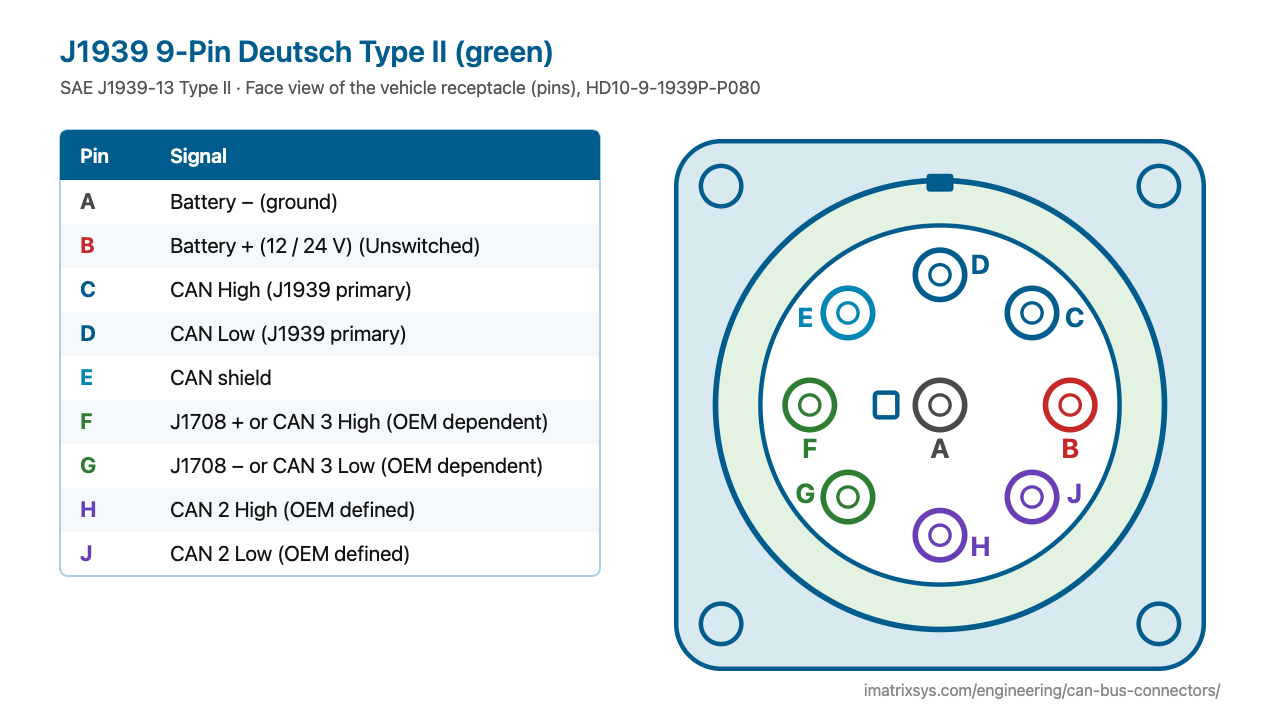
The green Type II uses the same face as the black Type I: A in the centre, CAN 1 on C/D, battery on A/B. What changes is the keying at the F position and, on many trucks, what F/G and H/J carry.
Face view of the vehicle receptacle (pins), HD10-9-1939P-P080
| Pin | Signal |
|---|---|
| A | Battery − (ground) |
| B | Battery + (12 / 24 V) — Unswitched |
| C | CAN High (J1939 primary) |
| D | CAN Low (J1939 primary) |
| E | CAN shield |
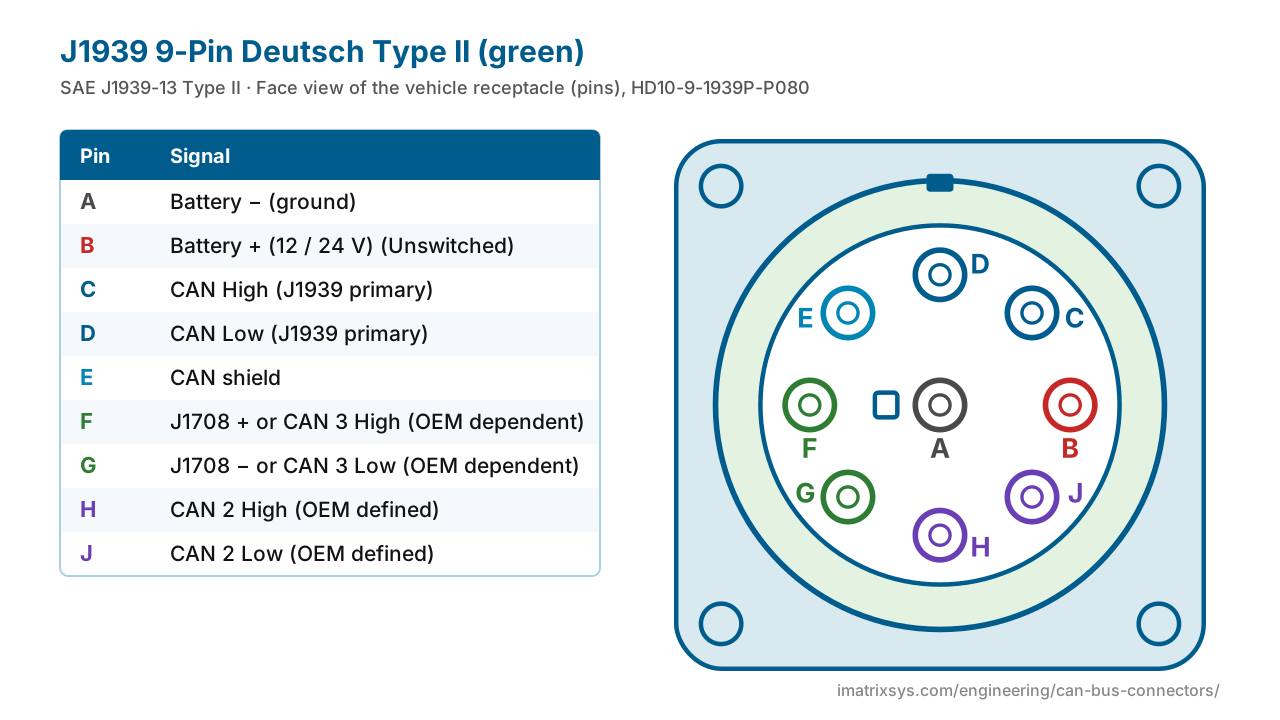
| F | J1708 + or CAN 3 High — OEM dependent |
| G | J1708 − or CAN 3 Low — OEM dependent |
| H | CAN 2 High (OEM defined) |
| J | CAN 2 Low (OEM defined) |
| Standard | SAE J1939-13 Type II (connector approved 2011) |
|---|---|
| Bit rate | CAN 1 at 250 or 500 kbit/s (J1939-14) |
| Vehicle side | HD10-9-1939P-P080 / -BP03 receptacle, green |
| Keying | Narrower F position blocks black Type I tool plugs |
| Compatibility | Green tool cable fits black and green ports; black cable fits black only |
| Common network map | CAN 1 on C/D, CAN 2 on H/J, CAN 3 (if used) on F/G |
As trucks added more ECUs, OEMs moved the J1939 network to 500 kbit/s (SAE J1939-14, first issued October 2011). A tool that joins a bus at the wrong bit rate can bring the whole bus down, so SAE approved a keyed Type II connector the same year: the F position is narrower, so an old black plug cannot be pushed into a green port.
Green ports appeared from about 2013–14 and became general on model-year 2016 trucks. By February 2016 the on-highway OEMs had aligned on one map for extra networks: CAN 2 on H/J and, where used, CAN 3 on F/G.
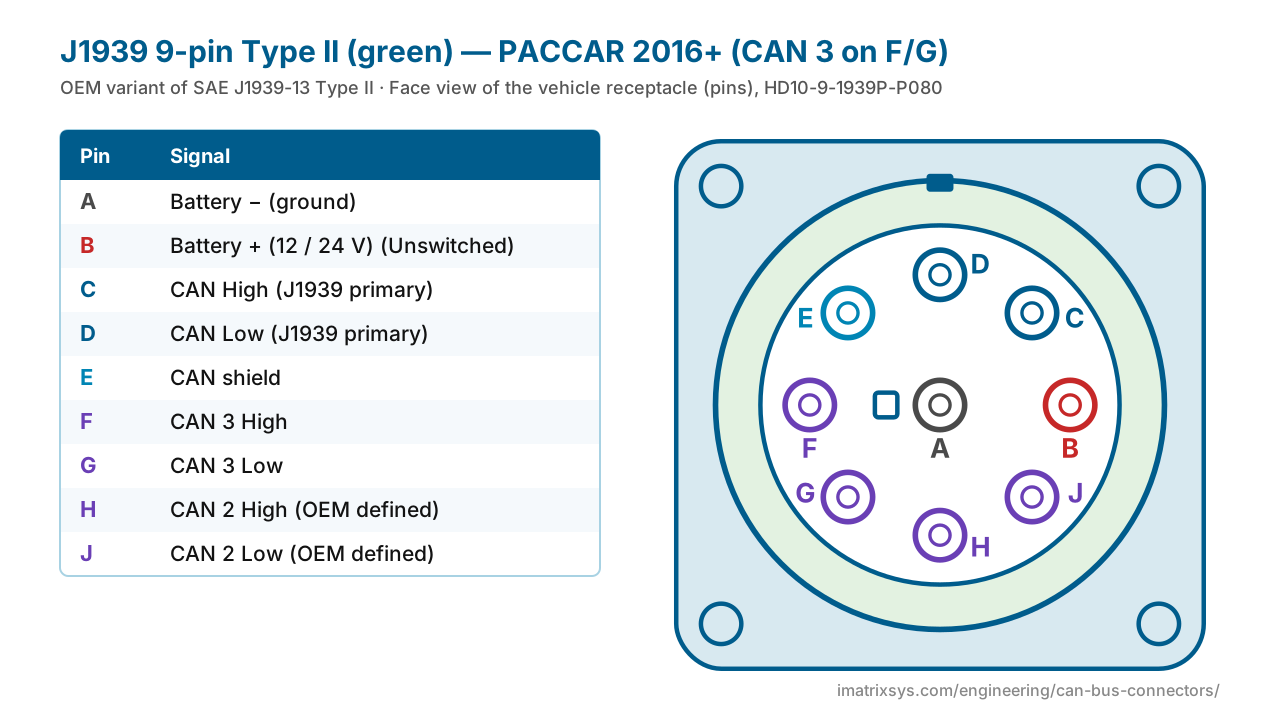
On some 2016+ PACCAR trucks the powertrain traffic moved off C/D onto CAN 3 on F/G. A tool reading only C/D then sees little. Choose the PACCAR 2016+ variant above, or set the converter’s bus to CAN 3.
Choose any two connectors to get a pin-to-pin wiring diagram, with wire colours, which pins to leave unconnected, and the power and termination warnings that matter. Hover a wire to trace it.
Pick two connectors to draw the wiring. (Needs JavaScript.)
Green (Type II) supports 500 kbit/s networks and has a narrower F position. A green tool cable fits both black and green ports; a black cable will not fit a green port. The pin letters and main functions are the same.
The letters and nominal functions match the black Type I. What differs is OEM use: CAN 2 is on H/J on most trucks, and some PACCAR trucks carry CAN 3 on F/G instead of J1708.
Not if the truck has a green port — it will not plug in. Use a green Type II cable, and make sure the adapter supports 500 kbit/s.
Yes. Green Type II tool cables are backward compatible with black Type I ports.
On some of these trucks the powertrain network was moved to CAN 3 on pins F/G. Use a cable or tool that reads F/G, or a CAN 3 crossover.
Sources: Drew Technologies: Industry Connectors Reference (rev 1.5); Kvaser: J1939-13 Type II connection; CSS Electronics: J1939 explained; Diesel Laptops: the green 9-pin J1939 connector; TE Connectivity HD10-9-1939P-P080 (green); SAE J1939-14 (abstract); SAE J1939-13 (abstract); PEAK-System: PCAN-Cable J1939; Intrepid: J1939 Type II to DB9 cable.
Last reviewed 2026-10-27. Pin assignments follow SAE J1939-13 Type II; OEM variants are noted where we could verify them. Spotted an error? Tell us.
iMatrix designs and builds CAN, J1939 and OBD-II harnesses for OEMs and fleets, and our FleetConnect telematics devices plug straight into the 9-pin and OBD-II ports. Tell us the two ends and the quantity.