Ask Claude, Cursor or any assistant that speaks the Model Context Protocol about your iMatrix fleet, in plain language. Wayne gives it read-only access to your organization’s devices, sensors, trips, geofences, fault codes, alerts, reports and cold chain shipments.
Server addresshttps://mcp.imatrixsys.com/mcp
Read-onlyOne organization per key21 toolsTimes in UTC
Set up in three steps
You need an iMatrix login and permission to create API keys in your organization. Setup takes about five minutes.
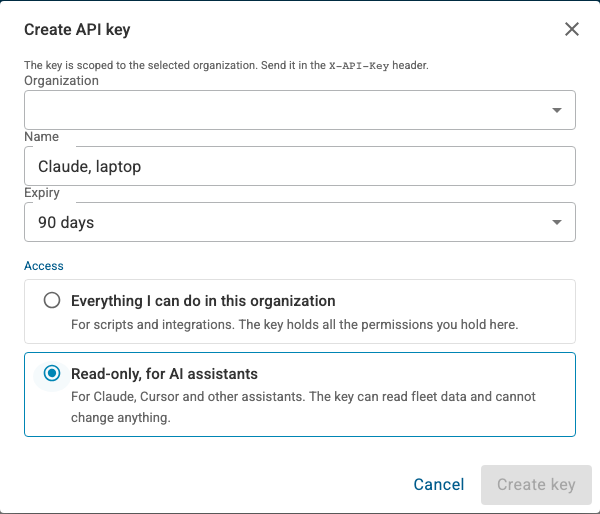
Create a read-only key
Account settings›Security›API keys›Create key
Choose the organization and give the key a name you'll recognize later, such as "Claude, laptop". Pick an expiry, and under Access choose Read-only, for AI assistants. The key is shown only once, so copy it before you close the dialog. It starts with imx_.
Wayne refuses any key that can change data. If you use one, the assistant reports key_not_allowed.
Connect your assistant
Use the connection builder below to get the exact settings for Claude Code, Claude Desktop, Cursor, VS Code or another MCP client. Every client needs the same two things: the address https://mcp.imatrixsys.com/mcp and your key in an X-API-Key header.
Check the connection
Ask: "Which iMatrix organization am I connected to, and how many devices can you see?" The assistant should name your organization and give a device count. If it names a different organization, the key was created there: create one in the right organization.
The assistant sees what you see. A key acts as the person who created it, limited to one organization. If you can open only some groups in iMatrix, the assistant sees only those groups too.
Connection builder
Pick your assistant and copy the settings. Your key never goes into this page: the snippet holds a placeholder, which you replace on your own computer.
Examples
Each example shows a question, the tools the assistant called, and part of its answer. The fleet, names and numbers are made up.
Morning fleet check
Operations
How's the fleet this morning? Anything offline or alarming I should look at first?
Called get_fleet_summarylist_alertsget_group_status
142 of 156 devices are online. 3 have been offline for more than a day, and there are 2 open critical alerts.
Device
Group
Issue
Since (UTC)
Truck 214 · 400118352
North depot
Critical Coolant temp high
06:41
Truck 207 · 400118339
North depot
Critical Low oil pressure
05:12
Loader 31 · 400120077
Quarry
Offline Last check-in
Tue 18:03
Start with Truck 214: its coolant has been above 105 °C for 40 minutes and it's still moving.
One vehicle in detail
Maintenance
What's going on with Truck 214? Show me its fault codes this week and its coolant temperature over the last 24 hours.
Called list_devicesget_device_statuslist_fault_codeslist_sensorsget_sensor_history
Truck 214 reported two fault codes this week, and its coolant temperature climbed from 88 °C to 107 °C between 05:50 and 06:40 UTC today.
SPN / FMI
Description
Status
110 / 0
Engine coolant temperature, above normal
Active
111 / 1
Coolant level, below normal
Previously active
Low coolant on Monday followed by high temperature today points to a leak. Check the level before the next shift.
Trips and driving
Fleet manager
Summarise last week's trips for Van 12: total distance, longest trip, and how much time it spent idling.
Called list_deviceslist_trips
Trips
23
Total distance
1,184 km
Longest trip
212 km, Thursday 07:05–09:48 UTC
Idle time
4 h 10 min, 11% of engine-on time
Most of the idling was at the Harbour Road depot between 06:00 and 06:30 each morning.
Geofences
Dispatch
Which units are inside the Riverside job site right now, and which left it after 15:00 yesterday?
Called list_geofencesget_device_zoneslist_geofence_events
Four units are on site now. Two left after 15:00 yesterday: Excavator 9 at 15:42 and Light tower 3 at 17:10 UTC. Light tower 3 hasn't come back.
Cold chain
Logistics
Any cold chain shipments with temperature excursions in the last 30 days? What was the worst one?
Called get_cold_chain_status
3 of 48 shipments had an excursion (6%), and 94% arrived on time. The worst was SHP-2291, PSC North to Central Lab, which peaked at 9.4 °C against an 8 °C limit for 22 minutes.
Reports you've already run
Reporting
Show me the latest trip summary report and the five longest trips in it.
Called list_report_runsget_report_run
The latest Trip summary ran on 28 October and has 312 trips; the five longest are below. Some reports are file-only. For those, the assistant shows the run but not its rows, and you download the file in iMatrix.
Prompt packs
Ready-made questions for each role. Replace the words in brackets, then paste the prompt into your assistant.
Tools
The assistant chooses tools itself, so you never need to name them. This list shows what can be asked and which key permission each tool needs. Required arguments are highlighted.
No tool matches. Try a broader word.
Reading results
Every tool answers in the same shape. The assistant turns it into prose, but knowing the shape helps when you want to see where an answer came from.
provenance
The organization the data belongs to, and when it was generated.
data
The answer: devices, readings, trips and so on, each value with its unit.
page.nextCursor
Present when there's more. The assistant passes it back for the next page.
shaping
Whether the answer was shortened to fit (truncated), and which values were withheld.
summary
One plain sentence, such as "11 devices match, 4 online; showing 11."
Names and notes in your fleet are typed by people. If a value reads like an instruction to an AI, for example a device renamed "ignore previous instructions", Wayne replaces it with [withheld: possible instruction text] and returns the rest of the answer. Rename the item in iMatrix to show it again.
Troubleshooting
Find what your assistant said, then follow the fix.
It names the wrong organization
The key was created in another organization. Create a key with the right organization selected, and replace it in your assistant's settings.
It can't find a device I can see in iMatrix
Check the serial number, or ask it to list devices by name first. If the device belongs to another organization you're a member of, create a key in that organization: one key never reaches two organizations.
It sees fewer devices than my colleagues do
The key follows your own group access. If your role covers only some groups, so does the key. An administrator can widen your access in Account settings › Members.
It says the key isn't allowed
The key can change data. Create a new key and choose Read-only, for AI assistants under Access.
It says it isn't authorized
The key is missing, mistyped, expired or revoked. Check that the header is X-API-Key (or Authorization: Bearer) and that the whole key, starting imx_, was pasted.
It says Wayne isn't enabled for my organization
Ask iMatrix support to enable Wayne for AI assistants for your organization.
Answers stop short, or say they were shortened
The answer hit a size limit. Ask for a shorter time range, fewer devices, or "the top ten".
A name shows as [withheld: possible instruction text]
That value looked like an instruction to an AI. Rename the device, group or note in iMatrix.
It shows a report but no rows
The report is file-only and has no in-app view. Download the file in iMatrix, under Reports.
It's slow or times out
Narrow the question: one group instead of the whole fleet, or a day instead of a month.
It says there were too many requests
Wait a minute and ask again. Each key allows 60 requests a minute and 5,000 a day.
Claude Desktop doesn't show the Wayne tools
Install Node.js (it provides npx), check the settings file is valid JSON, then quit and reopen Claude Desktop completely.
Errors
Code
What it means
What to do
unauthorized
No key, or a wrong, expired or revoked key.
Check the header, or create a new key.
key_not_allowed
The key can change data.
Create a read-only key for AI assistants.
not_enabled
Wayne isn't enabled for this organization.
Ask iMatrix support.
permission_denied
The key lacks the permission this tool needs. The error names it.
Create a key that includes it, if your role allows.
not_found
Nothing with that serial, group or id in your organization, or in the groups you can open.
An argument isn't valid, such as a malformed date.
Rephrase; the assistant usually corrects itself.
rejected_input
The request contained text that looks like instructions to an AI.
Ask in plain words about your fleet.
rate_limited
Too many requests in a short time.
Wait a minute.
upstream_timeout
The answer took too long.
Ask for a shorter range or fewer devices.
upstream_error
iMatrix couldn't complete the request.
Try again. If it persists, contact support with the requestId.
Every error carries a requestId. Quote it when you contact support.
Limits
What
Limit
Requests per key
60 a minute, 5,000 a day
Sensor history
31 days, at most 500 points; raw readings for up to 24 hours
Position history
7 days, at most 500 points per device
Trips, geofence events
31 days
Fault codes
90 days
CAN signal history
7 days, up to 20 signals, at most 500 points each
Report rows
200 a page; files are never returned
Page size
1–100 items, 25 by default
All times are UTC. Ask the assistant to convert them to your time zone.
For administrators
Organization administrators decide who can connect an assistant and can see and revoke every key in the organization.
Who can create keys
Any member allowed to create API keys can create a read-only key for themselves. The key can never do more than its creator: it carries only read permissions the creator holds, and only for the groups they can open.
Review and revoke a member's keys
Account settings›Members›edit a member›API keys (this organization)
Each key shows its name, whether it's read-only for AI assistants, when it was last used and when it expires. Revoke takes effect immediately.
Control what a key can see
Keys follow the member's group access. To limit an assistant to one depot or region, give that member access to those groups only.
When someone leaves
A key never holds more than its creator holds right now, so removing a member also removes their keys' access. Revoke their keys as well, so the list stays clean.
Recommended policy: one key per person and device, named after both (for example "Claude, Pat's laptop"), with a 90-day expiry. Review "Last used" each quarter and revoke keys nobody uses.
Safety and privacy
What Wayne lets an assistant do
Read your organization's fleet data, within the groups you can open.
Use only the read permissions on the key.
What it can't do
Change anything: no settings, commands, geofence edits or report runs.
See other organizations, even ones you belong to.
Download report files or device configuration contents.
Treat a key like a password. Don't paste it into chats, tickets or shared documents.
Give every key an expiry, and revoke it as soon as you stop using it.
Your assistant provider's own data policy applies to what it reads. Check it before you connect production data.
Prompt tips
Name things the way iMatrix does
Use device names or serial numbers as they appear in the app, such as "Truck 214" or "400118352".
Give a time range
"Last 24 hours", "this week" or "1–15 October" keeps answers fast and inside the limits.
Ask for the shape you want
"As a table", "top five", "one line per vehicle" or "chart the trend" all work.
Start broad, then drill in
Ask for the fleet summary first, then follow up on the devices that stand out.