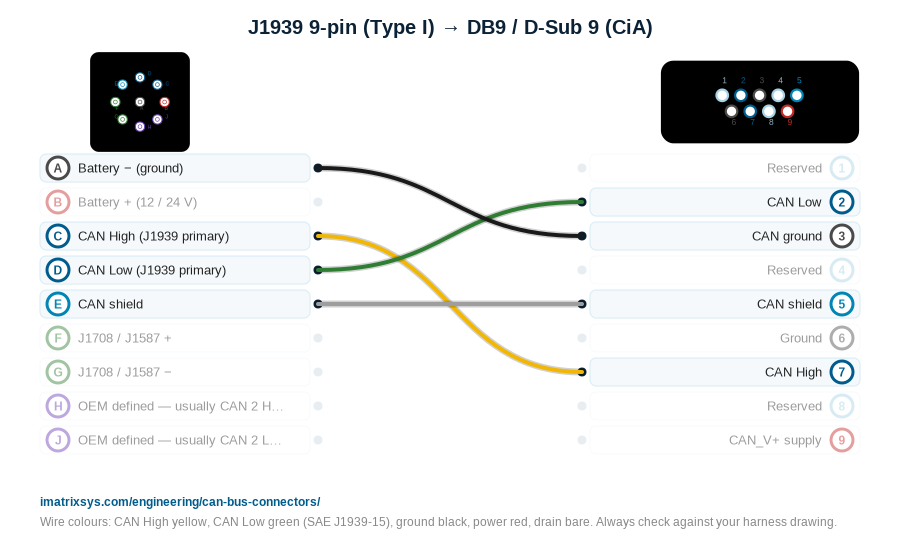
Pin to pin, J1939 9-pin (Type I) → DB9 / D-Sub 9 (CiA): pin C → pin 7 (CAN High); pin D → pin 2 (CAN Low); pin A → pin 3 (Ground reference); pin E → pin 5 (Shield / drain).
The cable most CAN interfaces need on a truck: the J1939 9-pin diagnostic port on one end, a DB9 (CiA 303-1) CAN interface such as a PCAN, Kvaser or CANalyzer adapter on the other. Power is not carried in this diagram; the interactive converter can add it after you check the voltages.
| J1939 9-pin (Type I) | Signal / wire | DB9 / D-Sub 9 (CiA) |
|---|---|---|
| C | CAN High | 7 |
| D | CAN Low | 2 |
| A | Ground reference | 3 |
| E | Shield / drain | 5 |
Full pinouts, variants and sources are on each connector's page.
Wire J1939 9-pin (Type I) pin C to DB9 / D-Sub 9 (CiA) pin 7 (CAN High); J1939 9-pin (Type I) pin D to DB9 / D-Sub 9 (CiA) pin 2 (CAN Low); J1939 9-pin (Type I) pin A to DB9 / D-Sub 9 (CiA) pin 3 (Ground reference); J1939 9-pin (Type I) pin E to DB9 / D-Sub 9 (CiA) pin 5 (Shield / drain). Leave every other pin unconnected.
J1939 9-pin (Type I) is a stub on a bus that is already terminated at both ends: do not put a terminator in the adapter. An adapter does not terminate the bus. A healthy network measures about 60 Ω between CAN High and CAN Low with power off (two 120 Ω terminators). Use twisted pair for High and Low.
Power (J1939 9-pin (Type I) pin B, DB9 / D-Sub 9 (CiA) pin 9) is left unconnected. Tick “Carry power” to wire it, after checking voltages.
J1939 9-Pin Deutsch (Type I, black): 250 kbit/s. DB9 (D-Sub 9) CAN — CiA 303-1: Any (classic CAN & CAN FD). Set the interface to the bit rate of the network it connects to; a mismatch shows up as error frames or a bus-off, not as data.
Generated from the same pin data and rules as the interactive converter; pin assignments follow SAE J1939-13 and CiA 303-1 / CiA 106 (sources on each connector page). Last reviewed 2026-11-27. Spotted an error? Tell us.
Wiring diagrams: J1939 Type II (green) → DB9 · OBD-II → DB9 · J1939 9-pin → OBD-II · 6-pin J1708 → 9-pin J1939 · NMEA 2000 → DB9 · M12 → DB9 · RJ45 → DB9 · 3-pin Deutsch → DB9
iMatrix designs and builds CAN, J1939 and OBD-II harnesses for OEMs and fleets, and our FleetConnect telematics devices plug straight into the 9-pin and OBD-II ports. Tell us the two ends and the quantity.