Before you start: Park safely before you begin. The OBD-II port is powered whenever the key is in accessory or run — plug the device in first, then start the vehicle.
At a Glance
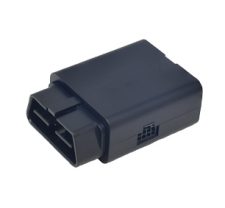
FC-201 hardware overview.
| Device type | Plug-and-play OBD-II fleet GPS tracker |
|---|
| Compatibility | Any 1996-or-newer vehicle with an OBD-II port (cars, light trucks, vans, SUVs) |
|---|
| Install | ~60 seconds · no tools · no wiring |
|---|
| Power | Vehicle OBD-II port · automatic ignition-state detection |
|---|
| Positioning | Multi-constellation GNSS: GPS · GLONASS · Galileo · BeiDou |
|---|
| Cellular | LTE with EdgeUplink global eSIM · Zones 1 & 2 included on every plan |
|---|
| Diagnostics | OBD-II / CAN bus — DTC fault codes, odometer, battery voltage, fuel level (Command plan) |
|---|
Installation & Activation
Plug it in and bring it online.
Locate the OBD-II port
It’s almost always under the dashboard on the driver’s side, within about 18 inches of the steering column — sometimes behind a small cover.
Plug in the FC-201
Line up the 16-pin connector and push it firmly onto the port until it seats. No tools, no wiring, no adapter.
Start the vehicle
Turn the key to accessory or start the engine so the port is powered. The FC-201 powers on and begins acquiring a GPS fix and cellular connection on its pre-activated EdgeUplink eSIM.
Confirm it’s online
Check the device status on imatrixsys.com — see “Managing your device” below. Driving a short distance with a clear view of the sky speeds up the first fix.
Managing Your Device
Verify status on imatrixsys.com.
All device management and data visualisation happen on the imatrixsys.com portal. Log in with your credentials and find your device by its IMEI — a traffic-light status shows its connection state:
Green — online and synchronised with the latest settings.
Yellow — online, but a configuration change is pending the next check-in.
Black — has not yet established a connection with the server.
Settings such as reporting frequency and the horizontal-accuracy threshold are pushed over-the-air — you never have to retrieve the device. Confirm a successful change via the check-in / updates icons in the dashboard.
Service Plans
Choose how the device reports.
Track · $13.99/mo · Most popular
Know what it’s doing
- GPS ping every 30 seconds
- Speed, idle & harsh-event alerts
- Full trip history & route replay
- Driver behaviour scoring
- Geofence & ignition alerts
- Maintenance reminders
Command · $18.99/mo
Know everything
- Real-time streaming (10-second updates)
- Full OBD-II / CAN bus diagnostics
- DTC fault-code alerts
- Fuel analytics & efficiency
- API access & webhooks
- Everything in Track
Every FC-201 ships with 30 days of your selected plan free. Recurring billing starts on day 31 — cancel any time, the hardware is yours forever. Compare FC-201 plans →
Health & Troubleshooting
Keep it reporting reliably.
- Status stays Black? Confirm the connector is fully seated and the ignition is in accessory or run so the port is powered.
- Move it between vehicles in under a minute — unplug, plug into the new car, and rename it in the portal. No re-activation needed.
- If the port sits awkwardly in the footwell, a low-profile OBD-II extension cable (sold separately) relocates the device up and out of the way.
- The Command plan unlocks 10-second real-time streaming, full OBD-II / CAN diagnostics, and API / webhook access.
- Connectivity Zones 1 & 2 are included on every plan via the EdgeUplink global eSIM — the device keeps reporting across regions without a SIM swap.